
Hinge
At-a-Glance
In 2024, I started dating again and noticed something important. As I used dating apps, I wondered: how do people with disabilities deal with dating challenges? Research shows this is a real problem - a study found that 75% of people with disabilities can't easily use dating apps, and 78% face major difficulties when trying to use them. Everyone deserves a chance to find love and build relationships in today's world, and it's our job to make that possible for all people.
Problem
Individuals with disabilities experience stigmatization/bias on dating apps due to the lack of inclusive and accessible communication features. Those with visual and hearing impairments, especially, are unable to connect with other individuals wholeheartedly and, as a result, may give up on online dating altogether.
Assumption 1: Most people with low vision send voice notes as a way of communication
Assumption 2: Assume most people who are hard of hearing would benefit from transcription features.
Solution
As the sole UX designer on this redesign, my goal was to determine ways in which users with disabilities can feel comfortable, accepted and desired so they they can meet potential partners safely and genuinely.


Process
After gaining a deeper understanding of user needs and company goals, I designed several new features to tackle accessibility challenges. I focused on how to improve accessibility for users with visual, and hearing impairments, ensuring they can fully engage with the product. I started by creating two task flows and then developed mid-fidelity wireframes. Through group collaboration meetings and user testing with 13 participants, I gathered valuable feedback. This process allowed me to refine the design, achieving an impressive accessibility flow rating of 78 out of 100.
User Research
I conducted supervised user research through several research methodlogies like competitive analysis, online surveys and interviews. I was able to recieve outstanding feedback from three users with different disabilities, one of my assumptions were validated in the survey results below.

Diving Deeper: User Interviews
After analyzing the screening results I wanted to gain insight on how to improve accessible features into the Hinge mobile dating app. After networking throughout several platforms I was able to interview three new participants who were advocates themselves of the dating disabled community.
This exercise helped me realize that the problems are deeper than visual accessibility but rather the lack of including those in the disabled community from the start, during research and ideation.

The general assumption amongst the majority of apps and websites that order to create accessible solutions by manipulating the contrast, color blindness and text size is the extent of inclusive design.
👉🏽 Turns out Accessibility Design and Inclusive Design are two different things.
I also created an empathy app to better illustrate the emotions and needs of my users below 👇

Wireframes - Mid to High Fidelity
The process below begins with mid-fidelity wireframes to match Hinge’s brand library as closely as possible. I returned it to my mentor for further iteration before moving forward to the high-fidelity mockups.
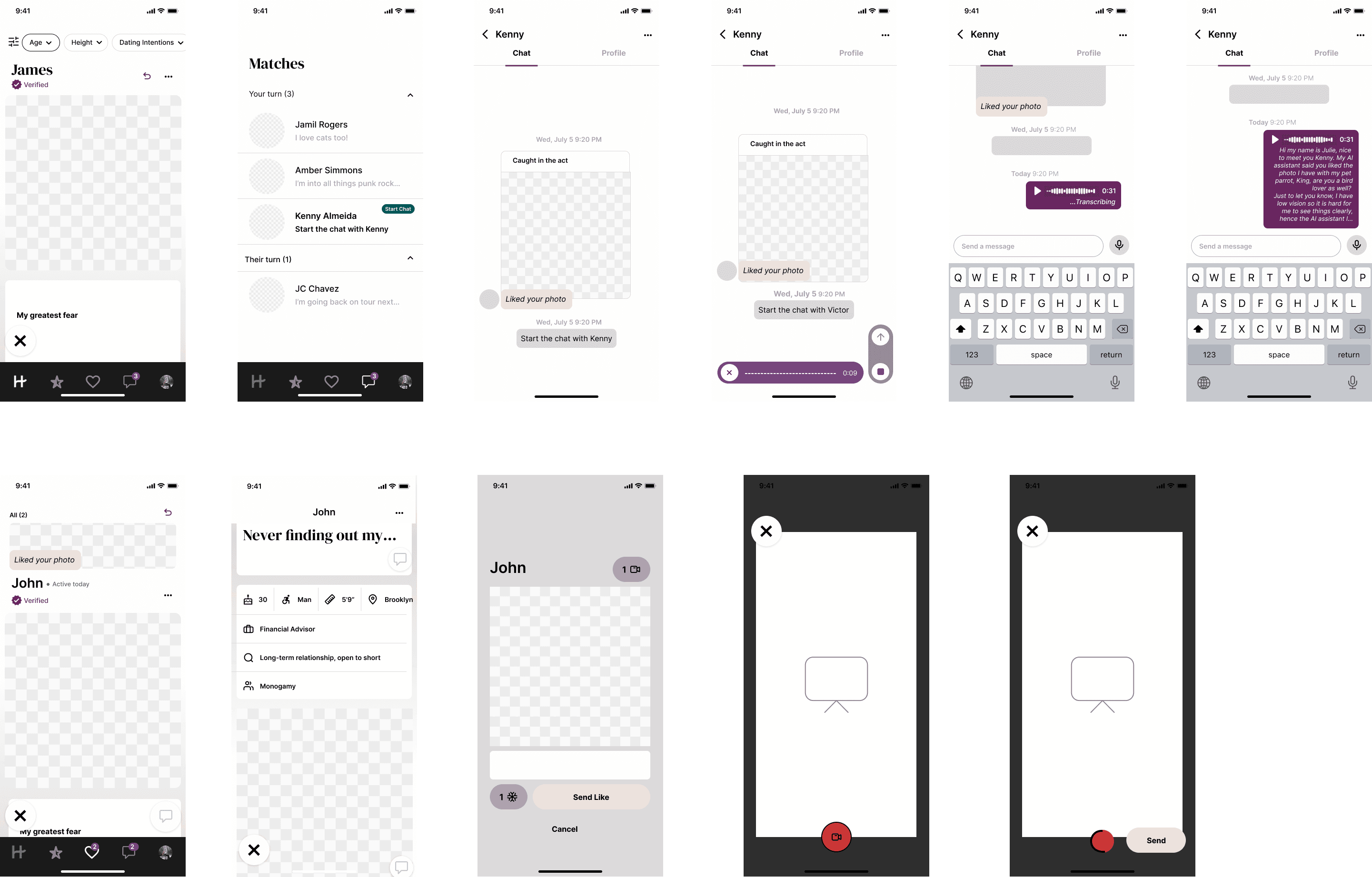
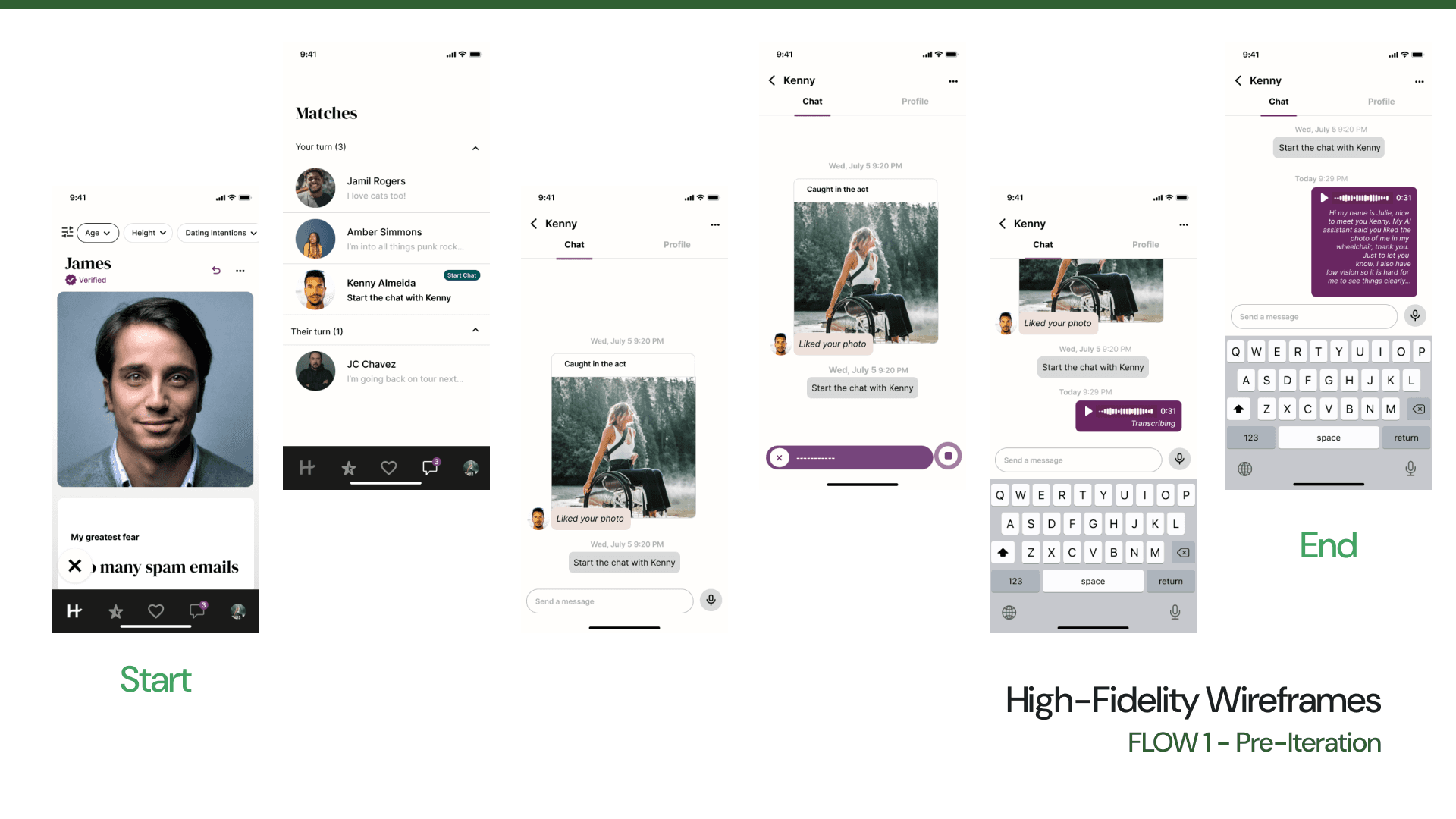
Below you will see the high fidelity mockups prior to usability testing. I built a homepage, match message screen and message screen in Flow 1. Following this in Flow 2, we see a match home screen and mock screens for opening the camera and recording a message.

Testing
The goal of our research was to determine whether users can accomplish two accessibility focused task flows. We tested 13 participants, including 3 of the original users we interviewed within our study.
Success Metrics
Completion of tasks - 80%/100%
The usability flow of accessibility features - 7/10
Severity and frequency of errors (via misclick rate/avg. duration) - 30%/100%

In our initial flow, we discovered performance gaps in the completion of tasks - falling 10% short of our target and experiencing a 20% higher error rate than anticipated.
By conducting a comprehensive analysis of heatmaps and participant feedback, we uncovered key usability challenges, specifically around icon clarity and message transmission. These insights directly informed our next design iterations, enabling us to address these user experience barriers.

Major Design Iterations 🔁
I made two significant changes based on feedback from usability testing sessions. I carefully considered participants' comments and suggestions, working diligently to incorporate them for the best user experience. My goal was to ensure that each iteration was thoroughly reassessed for accessibility issues, making the designs not only efficient to use but also enjoyable to interact with.

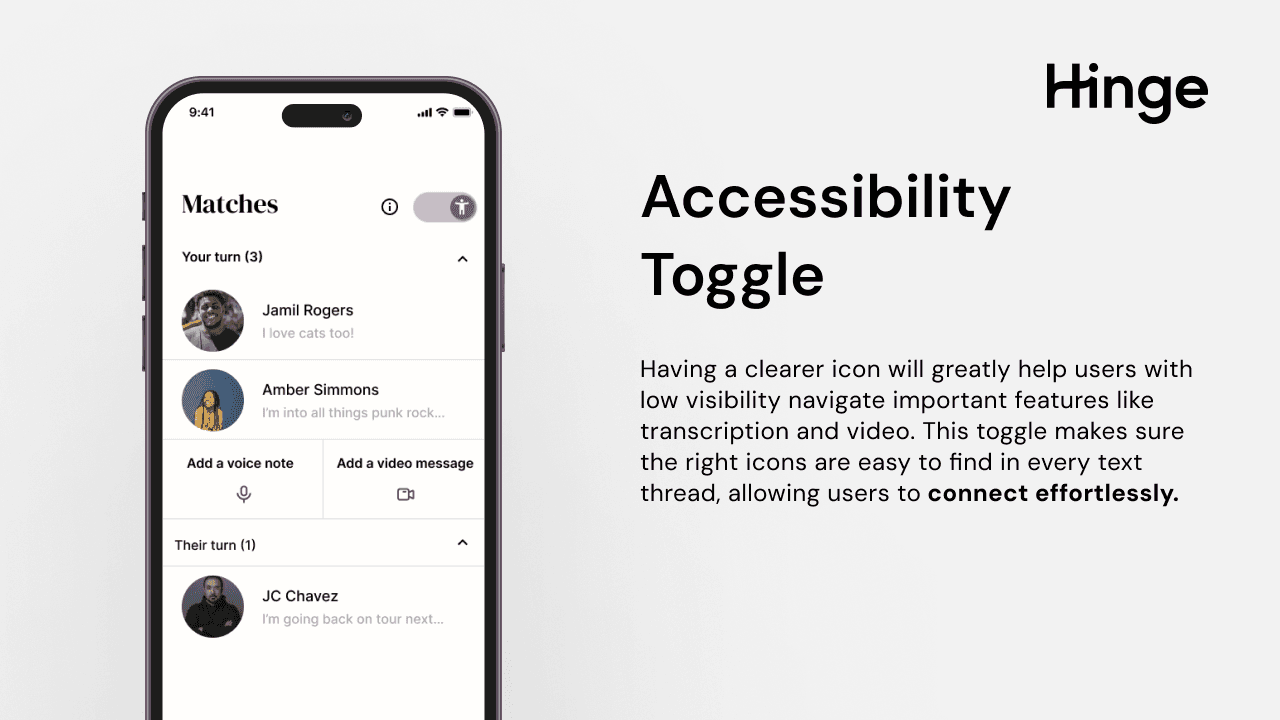
I decided to include an accessibility toggle in the message page after some of the gathered feedback. Several participants noted on the benefits of having a more obvious icon of some sort could help users with low vision in navigating and recording voice notes.

Another consistent feedback with the second flow was the differences in interaface with the first flow since both were a way to message, it made sense to avoid any confusion within the visual flow but rather bridge the two features into one. I kept similar interface and added a video message icon as well to merge the flows.
Final Design

What I Learned 🌱
My experience designing this new feature taught me valuable lessons:
Research is crucial: The initial research stage sets the foundation for the entire design process, guiding our decisions and outcomes.
Diversity within disabilities: I discovered that even individuals with the same disability often have unique needs, highlighting the importance of building genuine relationships with those you are designing for.
Adapting to challenges: While I couldn't test exclusively with low-vision users as planned, I learned to be flexible and work with available resources.
Building connections: Moving forward, I'm committed to continuing to develop stronger relationships within the disabled community through meetups, classes, and social media engagement.